Web lead assistant

Web Lead Call

Web Lead Call · For businesses and agencies

They submit the form.
Your rep takes the call.

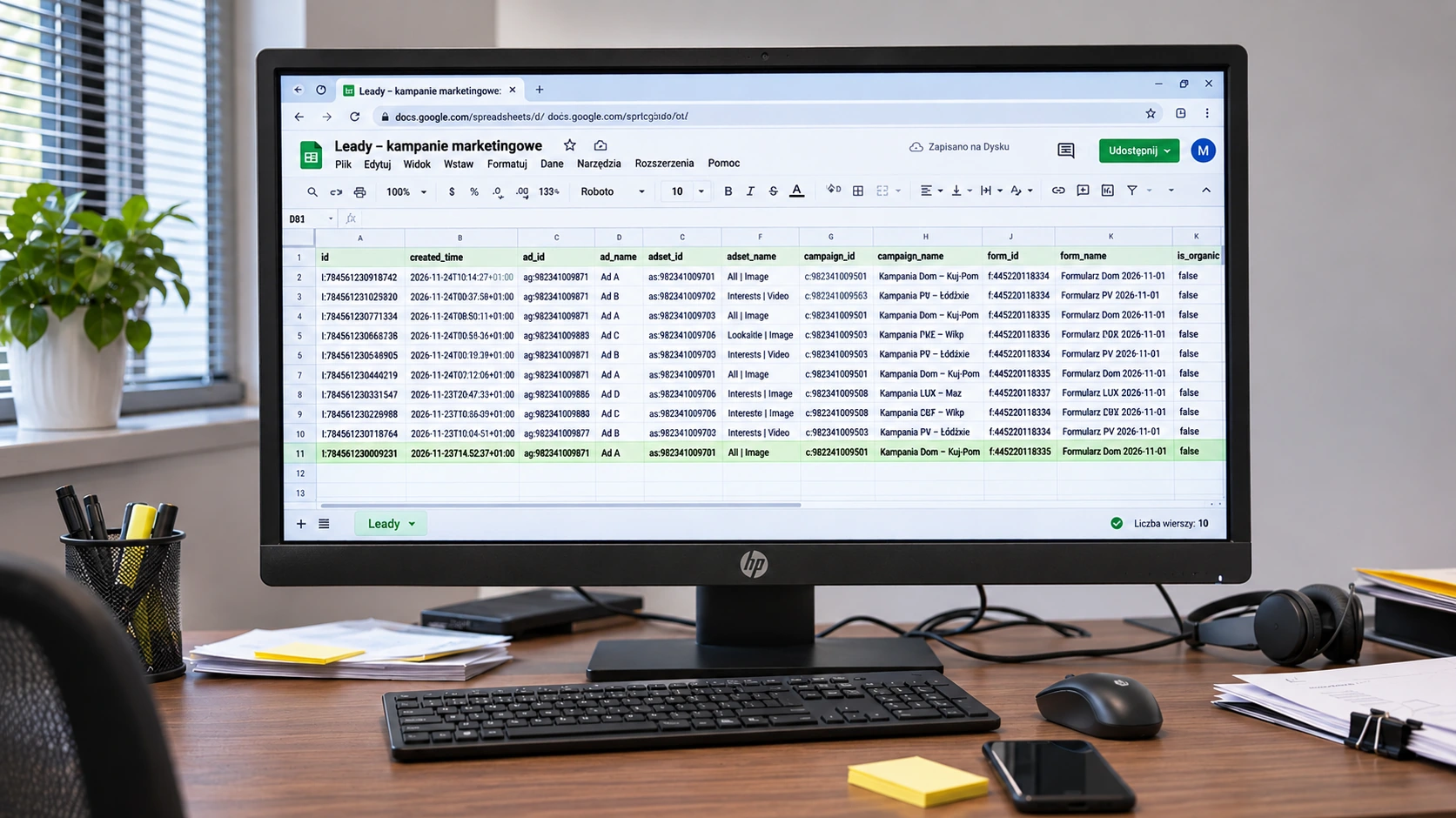
You put time and money into building forms, promoting your offer and generating leads. But an enquiry sitting in a spreadsheet can go unnoticed while the customer keeps looking.

When a lead comes in, Web Lead Call rings you, your sales rep or, if you run an agency, your client’s team. It summarises the enquiry and, once the recipient accepts, connects them to the customer so they can talk while the enquiry is still fresh.

From form to phone call

Simulation

One enquiry, one sales rep.

  1. Form
  2. Briefing
  3. Connection

09:41 · NEW ENQUIRY

A customer asks for a service quote.

They enter the equipment type and preferred time. Their answers go into Google Sheets.

The assistant briefs a sales rep and connects the customer only after the rep accepts.

Google Sheets · Enquiry #02409:41 · Form saved

Fictional information. This demo does not place calls.

Who it’s for

You have the leads. What happens next?

Call back before your customer finds a competitor.

You invest in advertising, build a form and pay to bring in enquiries. The weak point is often the time between someone submitting the form and hearing from your company. The longer they wait, the more time they have to contact a competitor.

  • Collect leads in one place. You can gather campaign enquiries in Google Sheets, for example.
  • Hear about new enquiries without watching a spreadsheet. WebLeadCall AI calls your sales rep when a new lead comes in.
  • Know what the customer needs before the call. The AI assistant gives your rep a short summary of what the customer put in the form.
  • Start the conversation sooner. Once the rep accepts the lead, they can be connected to the customer right away.
  • See how each lead was handled. You can record each step in Google Sheets or your CRM.

Help your clients take the final step with each lead

You run the campaign, and your client pays for the ads. Help them take the final step: reach out while the enquiry is still fresh. A faster response helps them get more from your work and their ad budget.

Faster follow-up can make the campaigns you run more effective and help your agency stand out. The goal is a phone alert within tens of seconds of receiving a lead; actual timing depends on the lead source and setup.

  • Add a new service to your offering. WebLeadCall AI calls your client’s sales rep when a new lead comes in and briefly explains what the prospect is asking for.
  • Help clients catch new leads in time. A phone call reduces the risk of a lead getting overlooked in a spreadsheet or inbox.
  • Help clients start conversations sooner. The rep can connect with the prospect right away, giving your client a better chance to make the most of leads they’ve already paid for.
  • Show what happened to each lead. If you have access to the report, you can see which alerts got through, whether a call took place and what outcome was recorded.
  • Stand out by showing exactly what you offer. When you pitch a campaign, you can show the client the whole process: from capturing the lead to calling the rep and reporting what happened.
How it works

Context first. Connection second.

  1. FormThe customer answers your questions in an enquiry form.
  2. Google SheetsThe enquiry reaches your spreadsheet. The assistant summarises it.
  3. Call to salesThe rep hears the briefing and decides whether to take the enquiry.
  4. Customer callOnce the rep accepts, the system connects the call and updates the status.
A customer fills in an enquiry form on her laptop.
Form

The customer answers your questions in an enquiry form.

Illustrative images.
Draft pricing · PLN

How pricing works

Subscription

PLN 100 / month

Includes your first 100 notifications each month.

Above 100 notifications

+ PLN 1 / notification

You only pay extra for notifications above the monthly allowance.

CRM integration (optional)

+ PLN 1 / lead

Charged for each lead handled in your CRM if you choose the integration.

A trial is a separate package, not a subscription.

See trial packages

Pricing is indicative and not a binding offer.

FAQ

Before you get started

Does the assistant speak with the customer instead of a rep?

It depends on how you want to handle enquiries. A Meta form or a form on your website usually captures the key details.

If the form gives us enough information, the assistant calls a sales rep or service agent first, gives them a short briefing, and connects them to the customer once they accept. If key details are missing, we can set up an optional workflow in which the assistant calls the customer and asks only for the missing information.

Do I need a CRM?

No. We work with the tools you already use. Without a CRM, we record the status and outcome in Google Sheets.

If you choose a CRM integration, we record the customer's details and create a lead in your CRM. We then update the record as the lead moves through each stage.

Can a team handle enquiries together?

Yes. If territory or expertise makes it clear who should take the enquiry, the assistant notifies that person.

If several people are a match, we can use shared routing. The assistant selects eligible reps by territory and expertise and calls them in parallel. The first rep to accept is connected to the customer, and the remaining calls are cancelled.

Where can leads come from?

Leads can come from forms on company websites and landing pages, or from supported lead forms in social media ads. We configure your chosen source during setup.

What trial packages can I choose?

Choose 50 leads for PLN 0, 100 for PLN 50, or 500 for PLN 200. Select a package in the trial form. This preview does not submit requests.

Request a trial

Try Web Lead Call

Once trial requests are enabled, we’ll call you back to show you how Web Lead Call handles a new enquiry.

This form is a preview. Use sample details. The site does not send or store them.

See what the sales rep hears

Explore two sample workflows and see what gets recorded in your spreadsheet.

Examples and setup